Fully automated visual radio

Turn listeners into viewers—automatically.

CLOSE RadioTV transforms the programming your station already produces into a dynamic audiovisual channel with automated cameras, synchronized video, graphics and live streaming.
  • No dedicated video operator required
  • Works with your current radio playout
PROGRAM CLOSE RadioTV · ON AIR
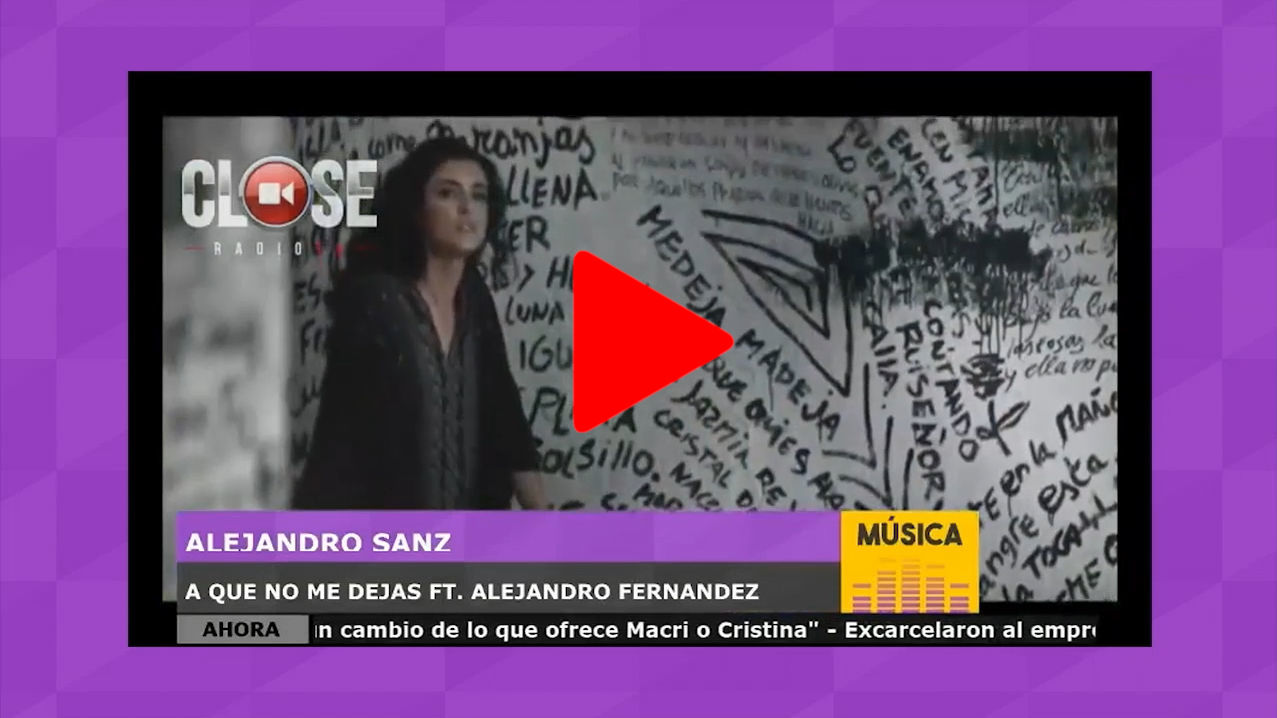
CLOSE RadioTV program output with music video, titles, logo and news ticker
CAM 01HOST
CAM 02GUEST
AUTOBOTCAM
AUTOMATION ACTIVE MULTI-PLATFORM
Automated camera direction 25+ playout integrations Cloud video content HD streaming workflow
Radio workflow in. Television experience out.

Your station keeps working the way it already does.

The radio automation remains in control. CLOSE RadioTV reads what is happening on air, combines the right visual source and produces the program automatically—without adding repetitive tasks for the operator.

Keep the playoutIntegrate with the radio automation system your team already knows. Automate the visualsMatch music, microphones, cameras, graphics and scenes to every on-air event. Reach every screenDeliver a continuous visual channel to websites, mobile devices and compatible platforms.
One connected visual production system

Everything required to make radio visible.

From the studio microphone to the final stream, each element is coordinated around the live radio program.

Direction

Automated cameras

BotCAM follows the active speaker and returns to programmed content when the microphones close.

Content

Cloud video clips

Find and prepare the video associated with the music scheduled by the on-air system.

Composition

Smart scenes

Combine cameras, videos, images, titles and information in flexible layouts.

Graphics

Titles and overlays

Present artist data, branding, tickers, news, weather and commercial messages.

Distribution

Live streaming

Publish the finished program to the station website and configured social destinations.

Control

Remote WebApp

Review cameras and trigger scenes from a responsive browser interface.

The visual radio signal path

Automation connects every step of the production.

Program metadata and microphone activity become the cues that drive the finished visual channel.

01

Radio playout

Music, commercials, programs and live events remain scheduled in the existing workflow.

02

Event intelligence

CLOSE RadioTV receives metadata, microphone activity and operational triggers.

03

Visual composition

The system selects cameras, video, titles and the correct scene automatically.

04

Live distribution

The completed program reaches web, mobile and configured streaming platforms.
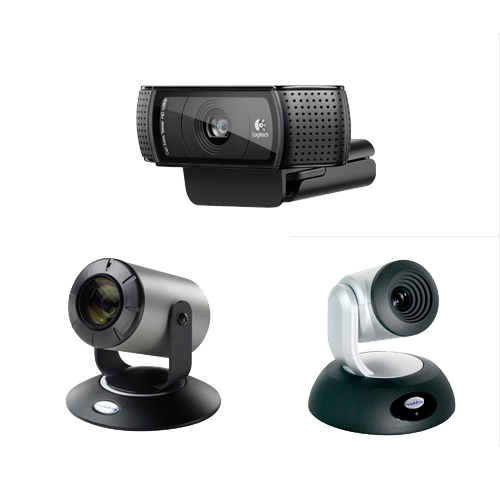
Camera options supported by CLOSE RadioTV including webcam and professional studio cameras
MIC 02 Speaker detected CAM 02 · PRESET 04
AUTO SWITCHTransition ready
BotCAM + TALLY detection

The right camera, whenever someone speaks.

BotCAM automates video direction from studio audio. When a microphone becomes active, the system can select the corresponding shot; when the live segment ends, programming returns to music video, commercials or the scheduled scene.

  • Audio-driven switchingFollow the people speaking without a dedicated director.
  • TALLY light detectionUse the studio's on-air state to coordinate live camera content.
  • PTZ presetsRecall configured pan, tilt and zoom positions for hosts and guests.
  • Automatic returnResume scheduled audiovisual programming as soon as the live microphones close.
Music becomes television

A visual channel with content from the first day.

CLOSE Cloud Services can use the song information supplied by the automation system to find and prepare its corresponding video. The next time that track plays, the content is already available locally.

IdentifyRead the artist and title from the playout event. PrepareLocate and download the matching audiovisual content. BroadcastKeep audio and video synchronized with the on-air item.
CLOSE CLOUDCONTENT READY
Music video and synchronized on-screen graphics in a CLOSE RadioTV visual radio output
On-air metadata receivedVideo synchronized with current trackREADY
AVAILABLE LOCALLY
Smart Scenes

Build the visual identity of every program.

Arrange cameras and media freely, then connect each composition to on-air conditions, scheduled events or manual triggers.

Scene library12 layouts
LIVE INTERVIEW · 1920 × 1080
CAM 01 · HOST
CAM 02 · GUEST
LIVE INTERVIEWHOST NAME · PROGRAM TITLE
NOWCurrent headlines, station information and sponsor messages
LAYERS 6 ACTIVE
Camera 01LIVE Camera 02LIVE Lower thirdON Station logoON News tickerON Sponsor bugAUTO
Picture in pictureCombine live video sources in a single composition. Chroma keyCreate virtual sets and replace camera backgrounds. Dynamic graphicsTitles, artist data, tickers, time, weather and RSS. Event automationTrigger layouts from schedules, conditions and macros.
Flexible video inputs

Use the cameras and sources that fit your studio.

Build with accessible webcams, professional studio cameras, capture hardware, IP sources or remote participants. Each source can become part of any scene.

From one studio to a complete operationCLOSE RadioTV supports flexible source and scene configurations that can grow with the station.

HD webcamsFast studio deploymentUSB
HD-SDI / HDMIProfessional capture cardsVIDEO
PTZ camerasMotion and stored presetsCONTROL
IP camerasRTSP and compatible feedsNETWORK
SmartphonesMobile camera contributionMOBILE
NDI and streamsNetwork video sourcesIP VIDEO
Screen captureComputers and presentation sourcesDESKTOP
Virtual meetingsSeparate participant video inputsREMOTE
One production, every screen

Broadcast live beyond the studio.

Publish the finished program continuously on your website and route it to the configured social and streaming destinations. CLOSE RadioTV keeps production and distribution inside one connected service.
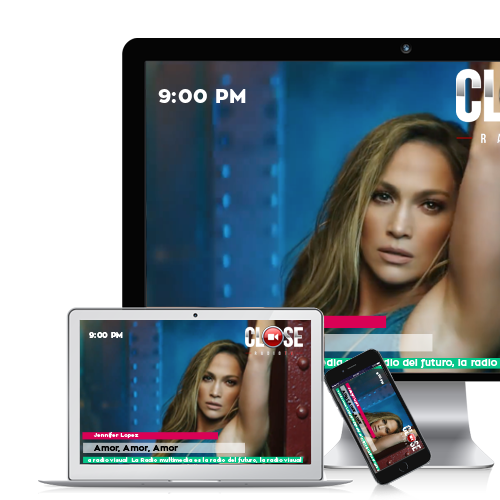
CLOSE RadioTV live visual radio channel displayed on mobile devices WEBSITE 24/7 SOCIAL LIVE MOBILE READY
Control when you need it

Automatic by default. Immediate when the producer takes over.

Keep continuous programming automated, while giving operators and producers direct access to the moments that require a human decision.

01 · AUTOMATIC

Run the visual channel continuously

Use playout events, microphone activity, schedules and conditions to drive everyday production.

02 · LIVE ASSIST

Trigger the next scene instantly

Choose cameras, graphics and layouts with quick controls when a live show needs intervention.

03 · REMOTE

Operate from a responsive WebApp

See camera previews and manage the production from compatible desktop and mobile browsers.

04 · INTEGRATED

Connect external systems

Use the HTTP API and supported radio automation integrations to fit the wider technical workflow.

LIVE STUDIO
PROGRAM SPONSORYour visual message here
AD
Visual inventory
Branding · lower thirds · sponsor bugs · video spots
New value for audiences and sponsors

Give every broadcast a visual dimension.

A visual channel creates more ways to present the station, its talent and its commercial partners. Combine the reach of radio with the communication power of live video, movement and on-screen information.

Audience engagementLet listeners watch interviews, performances and the life of the studio. Expanded sponsorshipAdd branded graphics, sponsor positions and audiovisual campaigns. More distribution surfacesExtend the station brand across web, mobile and social video environments.
Your radio is already producing the story

Now give your audience the picture.

See how CLOSE RadioTV can connect your playout, studio cameras, visual content and streaming destinations in one automated workflow.