Native audio over IP for KIWI MIX
Your station leaves the cables behind.
Move every application, computer, input, bus and output into KIWI MIX through the network you already have. Uncompressed audio, instant hot routing and no complicated AoIP matrix.
- Free with KIWI MIX
- Unlimited terminals and audio channels
KIWI MIX · AUDIOIP NETWORK
LIVE
AVAILABLE COMPUTERS4 ONLINE
PLAYOUT-01 · SOURCESASSIGN IN REAL TIME
DESTINATIONKIWI MIXFADER 07
LOSSLESS PCM
EXISTING LAN HOT ROUTING ACTIVE UNLIMITED CHANNELS
Included free
Unlimited scale
Uncompressed audio
LAN or Wi-Fi
A new radio infrastructure
Every computer becomes part of the console.
KIWI MIX AudioIP replaces long analog cable runs, stacks of physical interfaces and difficult routing matrices with software. Install the AudioIP client on any sending or receiving PC, and its available audio appears directly inside KIWI MIX.
See every sourceDiscover connected computers and their available application outputs.
Assign it instantlyChoose the destination channel while the system remains live.
Change it anytimeReassign the source in seconds without rewiring the studio.
Included with KIWI MIX
Unlimited means unlimited.
AudioIP is the native network-audio system of KIWI MIX. There are no per-terminal or per-channel license costs for the KIWI MIX AudioIP environment.
∞COMPUTERSNo terminal limit
∞AUDIO CHANNELSNo channel limit
0ADDITIONAL LICENSESIncluded with KIWI MIX
Use the network you already have
Professional network audio without a dedicated network.
AudioIP was designed for real radio facilities, where business data, automation and production devices already share practical infrastructure.
Your current LAN
Connect through a properly functioning standard data network and avoid building a separate Gigabit-only audio network.
RECOMMENDEDWi-Fi computers
Bring compatible laptops and workstations into the AudioIP environment without a physical Ethernet run.
AVAILABLEConventional routers
AudioIP does not require specialized enterprise AoIP switching just to connect the typical radio workflow.
SIMPLE DEPLOYMENTNo dedicated audio network required.Network capacity and stability must still match the number of channels and the operating environment.
AUDIO SIGNALREAL TIME
SOURCEApplication audioAUDIOIPUncompressed PCMKIWI MIXLive fader
The audio arrives intact
Lossless by design. Ready for broadcast.
AudioIP transports uncompressed audio in real time. There is no perceptual codec removing information from the signal and no additional encode/decode generation loss between the application and the KIWI MIX channel.
- Uncompressed PCM transportPreserve the source without lossy compression.
- Real-time operationRoute live programs, microphones, buses and outputs.
- Built for continuous useDesigned to remain part of the station's 24/7 signal path.
Not only one PC output
Separate every program into its own mixer channel.
A single computer can run several audio applications at the same time. AudioIP can expose those application outputs individually, so KIWI MIX receives them as separate sources—not as one mixed desktop signal.
One PC. Many independent sources.Assign the playout system, two browser sessions and a cue player to different KIWI MIX faders.
PRODUCTION-PCONLINE
KIWI MIX
CH 01PLAYOUTCH 07NEWSCH 08REMOTECH 12CUE
Every direction · Every point in the mixer
Send audio to KIWI MIX. Receive audio from KIWI MIX.
Any authorized AudioIP computer can access the channels made available by the mixer—from individual inputs to complete program outputs.
Send application audio
Bring playout, browser, editing, communication and other software sources into dedicated faders.
Route in both directions
Use the same native AudioIP environment for source contribution and mixer distribution.
Receive mixer channels
Access individual inputs, microphone paths, buses, auxiliaries, cue or master outputs made available by KIWI MIX.
Installed in minutes
Assign the computer. Assign the program. Go live.
No complex matrix design and no Audio-over-IP specialist required for everyday operation.
Install
Add the lightweight AudioIP component to each computer that will send or receive audio.
MINUTESDiscover
Open KIWI MIX and see the available computers with their individual audio sources.
AUTOMATICAssign
Select the source and place it on the required fader, input, bus or output in real time.
ONE ACTIONHot routing means no interruption.Change the selected AudioIP source while KIWI MIX remains in operation.LIVE · INSTANT · REVERSIBLE
AUDIO NETWORK OPTIONSKIWI MIX
- Existing LAN or Wi-Fi
- Unlimited terminals
- Unlimited channels
- Application-level audio
- Hot routing in KIWI MIX
- Connect established Dante infrastructure
- Interoperate with compatible devices
- Use where the facility already standardizes on Dante
Dante supported · AudioIP prioritized
Keep compatibility. Remove the complexity.
KIWI MIX supports Dante for facilities that already use it. Its native AudioIP system provides a simpler radio-focused path: no per-channel expansion model, no dedicated audio network requirement and direct access to application-level sources.
- Choose AudioIP for the native KIWI workflowImmediate discovery, source selection and hot assignment inside the mixer.
- Use Dante when interoperability requires itConnect KIWI MIX to an established Dante environment without giving up the AudioIP option.
KIWI MIX · LIVE CONSOLEAUDIOIP CONNECTED
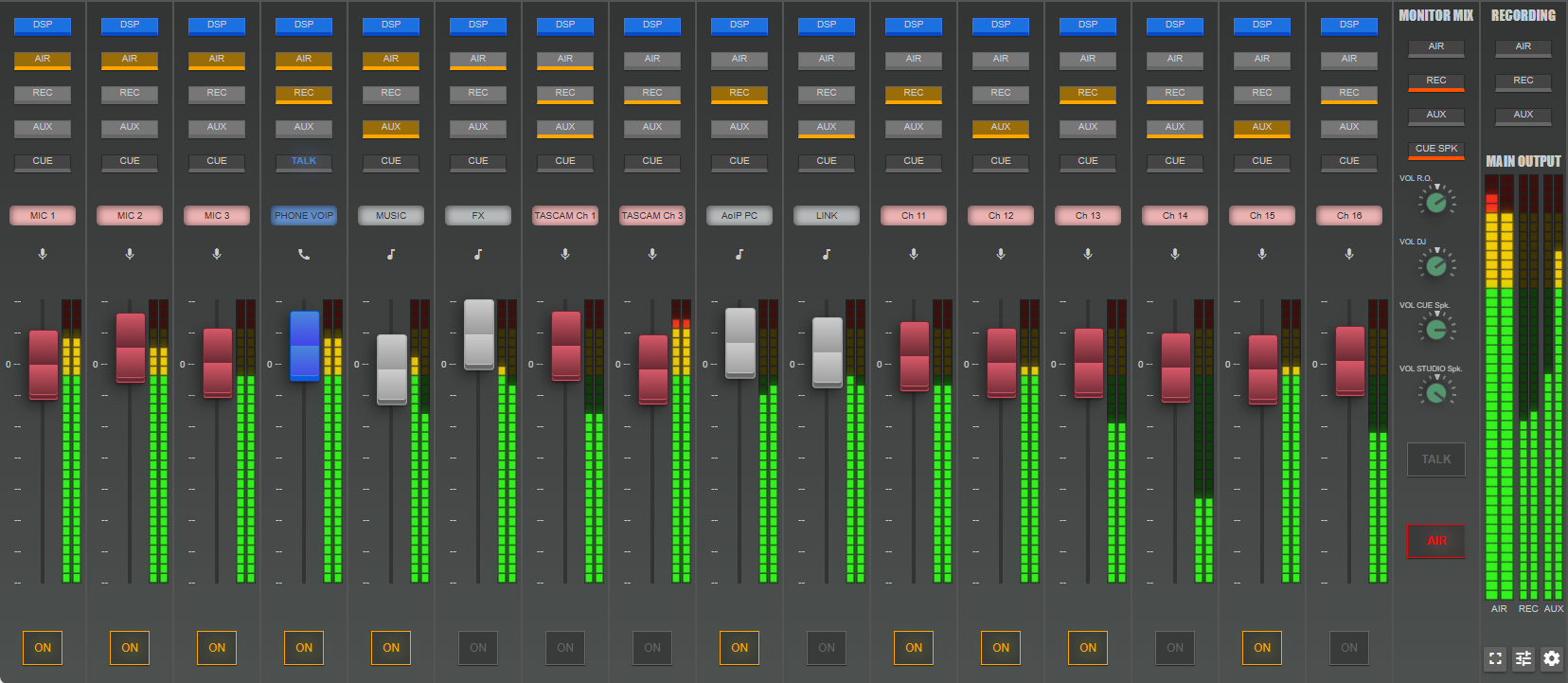
Designed together
AudioIP is not an add-on beside KIWI MIX. It is part of KIWI MIX.
Source discovery, routing, channel assignment and mixer control live in one operational environment. The operator works with familiar named sources and faders—not network addresses and abstract patch points.
Explore KIWI MIXA radio infrastructure that stays simple
Less hardware. Less configuration. More freedom.
Remove unnecessary audio cables
Move inter-computer audio through IP instead of adding physical interfaces and analog runs.
No AoIP engineer for routine changes
Let everyday users find sources and change assignments through the KIWI MIX interface.
Software-defined and low maintenance
Replace physical patching with named software routes that can be changed without rewiring.
Add channels without a license count
Connect more AudioIP terminals and sources as the station workflow grows.
Turn every computer into part of the studio
Your audio is already digital. Now let it move freely.
See KIWI MIX AudioIP discover, separate and route your real software sources across the network you already use.