Automated multicamera production
Every voice gets the right shot.
BotCAM directs the cameras automatically from microphone and on-air activity. Camera Director gives the producer complete visual control the instant a live moment needs a human decision.
- No dedicated camera operator required
- Automatic, assisted and manual operation
CAMERA DIRECTOR · STUDIO A
BOTCAMAUTOMANUAL
HOST
GUEST
PROGRAM · CAM 02
LIVE INTERVIEWGuest name · Program title
PROGRAM AUDIO
-12 dB
MIC 01HOSTACTIVE
MIC 02GUESTSPEAKING
MIC 03GUEST 2OPEN
PHONECALLERREADY
NEXT: CAM 01 · HOST KIWI MIX IP CONNECTED PROGRAM LIVE
Speaker detection
PTZ presets
Instant override
Console IP integration
Automation with editorial control
A camera system that understands radio.
Radio conversations are fluid. Speakers interrupt, microphones open and close, music starts, calls enter and the producer sometimes needs a different shot. CLOSE combines real-time studio information with a camera director designed for both continuous automation and immediate intervention.
BotCAM listens to the workflowMicrophone activity and console states become production decisions.
Camera Director controls the picturePreview sources, select shots, recall presets and trigger scenes.
CLOSE connects the complete showReturn automatically to music video, commercials or scheduled content.
One production system · Two operational layers
Automation handles the routine. The producer controls the exception.
BotCAM and Camera Director are strongest together: one keeps the show moving continuously; the other provides deliberate editorial control.
AUTOMATION LAYERBotCAMRUNNING
Automatic direction from the studio conversation.
BotCAM senses the signal present at each microphone and selects the configured camera or PTZ shot as dialogue moves between participants.
- Speaker-based switching
- On-air and microphone state awareness
- Automatic return to programming
ONE
WORKFLOW
WORKFLOW
PRODUCTION LAYERCamera DirectorREADY
Professional control whenever the moment demands it.
See every source, send a camera to air with one click, move PTZ cameras, recall presets and coordinate complete visual scenes.
- Live camera previews
- One-click shots and transitions
- Manual and assisted operation
How BotCAM follows the conversation
From microphone activity to the final shot—in real time.
The exact integration depends on the console, but the production logic remains simple and consistent.
On-air state
The console opens the microphones and the live camera workflow becomes active.
Voice activity
BotCAM senses the signal present at each enabled microphone.
Shot decision
The configured logic selects the camera, composition or PTZ preset.
Live switch
The selected shot reaches program while BotCAM continues following the dialogue.
When the on-air light turns offCLOSE returns to AUTOMATIC mode and resumes the music video, commercial, station ID or scheduled content already playing in the radio automation.AUTOMATIC
KIWI MIX · IP CONTROL DATACONNECTED
MIC 02AIR · VOICE ACTIVE
BotCAMCAM 02 · PRESET 04
PROGRAMGUEST CLOSE-UP
The strongest combination
KIWI MIX + BotCAM. Native IP intelligence from fader to camera.
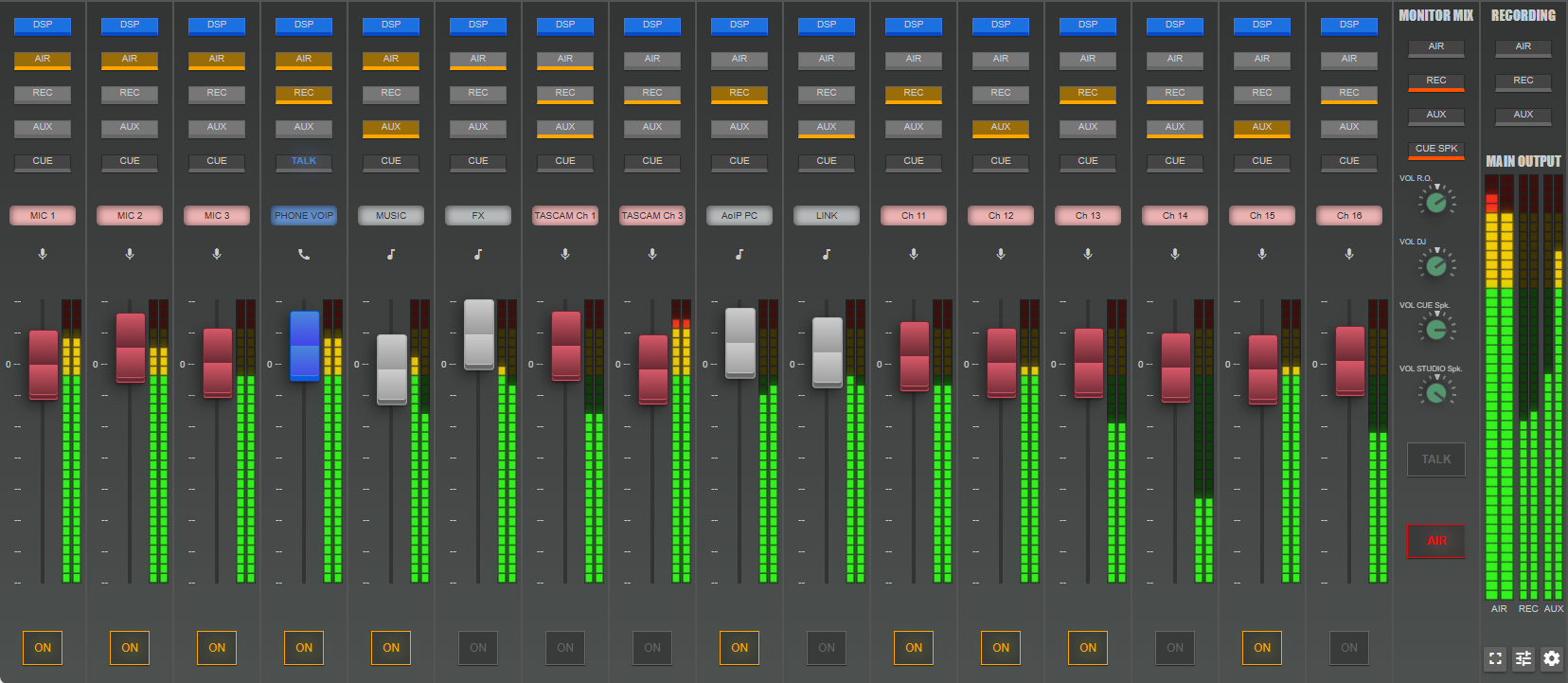
KIWI MIX communicates directly with CLOSE RadioTV over IP. BotCAM knows which channels are on air and receives the studio information it needs to drive camera automation as part of one coordinated CLOSE workflow.
- Direct IP integrationConsole states reach BotCAM without adding a separate manual task.
- One connected ecosystemMixing, camera decisions, scenes and final output work together.
- Built for visual radioThe operator keeps mixing the show while CLOSE produces the picture.
The right level of control for every show
Automatic when possible. Assisted or manual when required.
Move between operational modes without rebuilding the production or interrupting the signal.
Fully automatic
BotCAM follows microphones, speakers and on-air states continuously without a video operator.
Best for everyday programmingSemi-automatic
Keep BotCAM active while the producer overrides a shot, microphone assignment or scene when needed.
Best for interviews and special momentsManual direction
Select previews, cameras, transitions, PTZ presets and scenes directly from Camera Director.
Best for complex live productions
Camera Director
A complete live-production surface—not just an automatic switcher.
Camera Director places the essential controls in front of the producer: camera previews, program output, fast shot selection, PTZ movement, presets and scene triggering.
Flexible button layoutsOrganize the control surface around the studio and the way your team works.
One-click switchingSend a camera or prepared composition to air without navigating complex menus.
Remote WebAppPreview cameras and access operational controls from compatible browsers.
CAMERA DIRECTOR · LIVE PRODUCTION
PREVIEWPROGRAM
PTZ CONTROLCAM 02 · PRESET 04
More natural visual direction
One microphone can have more than one shot.
Assign multiple cameras, compositions or PTZ presets to each participant. CLOSE can vary the configured coverage so the program feels dynamic instead of mechanically repeating the same angle.
SPEAKERMIC 02 · GUEST
PTZ preset recallMove directly to stored pan, tilt and zoom positions.
Flexible coverageUse the configured shot choices for more varied direction.
Conversation scenesUse individual shots, two-shots or wider studio compositions.
Build around your studio
From practical webcams to professional PTZ production.
Camera Director works with the broader CLOSE RadioTV source environment, allowing stations to combine accessible cameras, professional capture hardware, IP video and remote contributors in the same production.
Beyond camera switching
The camera decision becomes part of the complete visual channel.
Combine the live studio shot with graphics, scenes, remote guests, scheduled media and distribution inside the CLOSE RadioTV ecosystem.
A better production model
Professional visual radio without adding pressure to the operator.
Reduce repetitive camera work
Let BotCAM cover the daily conversation while your team focuses on content, guests and audio.
Keep the picture moving
Maintain a consistent camera workflow across unattended, live and operator-assisted programming.
Take control immediately
Override automation and select the exact camera or scene when editorial judgment matters.
Grow the production gradually
Start with practical camera sources and expand toward PTZ, IP video, remote guests and richer scenes.
Let the conversation direct the cameras
Automate every routine shot. Control every important moment.
See Camera Director, BotCAM and KIWI MIX working together with your microphones, cameras and visual radio workflow.