Song and artist links
Introduce or close songs with concise, relevant information shaped for the station's voice.
Generate concise, station-specific spoken links from music logs, scheduled content and approved local information—then produce them with a configured presenter voice and place them into the on-air workflow.
“That was The Doors with Light My Fire. A warm afternoon is ahead, with local traffic moving normally on the main routes...”
AI Radio DJ is a production workflow. It combines the station's programming context, content instructions and approved data sources to prepare audio that fits a defined place in the schedule.
Each content type can be configured for the station, market and scheduled position. External information depends on the data sources connected to the installation.
Introduce or close songs with concise, relevant information shaped for the station's voice.
Turn approved local forecast data into short, scheduled reports rather than reading raw values.
Summarize configured incident and travel information for the audience's market.
Prepare brief updates from supplied or approved news material, following station instructions.
Schedule precise utility links, event reminders and recurring programming information.
Preview upcoming segments or content before a break to improve programming continuity.
Produce approved sponsor copy in the selected presenter style and scheduled position.
Create format-consistent promos, reminders and identity messages without repeating one template.
Prepare events, news, community information and other copy for a defined time in the log.
The station determines the inputs, style and scheduled use. AI Radio DJ prepares the script and voice asset for automation and playout.
Music log, scheduled event or manual content request.
Station instructions and configured local data sources.
Length, tone and content adapted to the scheduled purpose.
Configured presenter, pronunciation, music bed and transitions.
Schedule and play the finished asset through mediaTV.
Select from configured presenter voices, define pronunciation and combine speech with music or sound elements to produce a complete radio link.
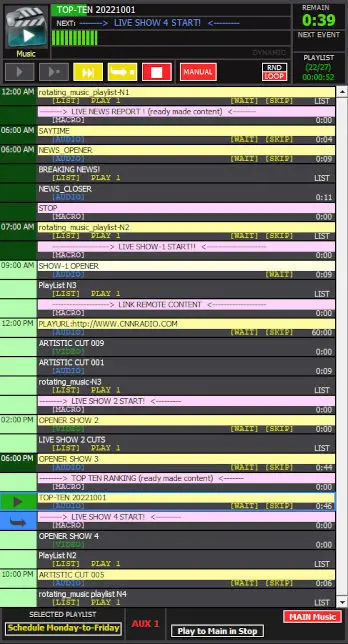
AI Radio DJ works with mediaTV so spoken content can be prepared for a specific position in the programming log. Operators keep control of scheduling while the generated asset becomes part of the normal playout sequence.
Reliable on-air use depends on good sources, clear prompts and appropriate review. AI Radio DJ should be configured around the station's editorial and commercial policies.
Weather, traffic, news and local information depend on the sources selected for each installation.
Set length, tone, prohibited language, pronunciation and the purpose of each content type.
Use review and approval where the station's editorial policy or content sensitivity requires it.
Generate content for a known break or event instead of producing unstructured commentary.
Review your use case, station style, content sources and mediaTV workflow with a CLOSE RadioTV specialist.